


Schedule a demo
See Oil Command in Action
Start a conversation with someone that understands your business. No bull, no buzzwords, just solutions.
Get Demo




See what’s new in Oil Command - product improvements, new features, and fixes.
.png)
The latest Help Scout improvements, features, and updates.
The latest Help Scout improvements, features, and updates.
The latest Help Scout improvements, features, and updates.
The latest Help Scout improvements, features, and updates.
The latest Help Scout improvements, features, and updates.
The latest Help Scout improvements, features, and updates.

This update brings full customization parity to the Customer Information section. Administrators can now edit the "CustomerInfo" label title directly within the Layout Editor, matching the behavior of other section titles. This change also includes a UI cleanup by removing the legacy gray header bar, providing a more modern, streamlined look that synchronizes instantly across both web and mobile platforms.
.svg)
This update introduces a comprehensive "Download & Sign" workflow within the Secure Customer Portal. Designed for partners who require physical stamps or manual signatures, this hybrid process allows customers to confirm or edit critical job data digitally before printing the ticket. Once physically signed, the document can be uploaded directly back into the portal, ensuring all authorizations are centralized, audited, and instantly visible for billing.
This update introduces the ability to combine multiple individual line items into a single consolidated "Summary Ticket" directly from the Line Items table view. This feature mirrors the "Summarize Tickets" functionality but operates at the line-item level, allowing for more granular billing and operational control. Additionally, it introduces "Summary Settings" in the Module Builder to automate the configuration process.
This foundational update brings full feature parity to the V2 platform by enabling the Line Items Module. Admins can now configure dedicated Line Item table views within the V2 Module Builder, complete with the robust filtering capabilities previously available in V1. This update unlocks advanced line item workflows, allowing users to view, filter, and edit data within a modern V2 interface.
This update introduces comprehensive filtering options within the Locations module, enabling Account Admins to isolate records based on specific operational criteria. Moving beyond a simple global search, users can now query locations by Field, Field Operator, Description, Driving Directions, and all active Custom Fields, significantly streamlining the process of high-volume record management.
This update introduces a comprehensive status management system for line items, moving away from a fixed, hardcoded list. Administrators can now define which statuses are active for specific modules, set default behaviors, and control whether the status field is editable or read-only. This ensures that the line item workflow precisely matches the operational needs of different business units.
This update introduces a robust, template-based rendering system (v2) for ticket printouts, replacing legacy hardcoded formats. By utilizing a dynamic rendering engine and configurable placeholders, administrators can now design customizable layouts and content variations that cater to specific client needs and diverse operational use cases.
This update introduces a specialized Currency configuration for Integer and Decimal properties. Users can now define monetary fields that automatically display with professional formatting, including dollar signs and thousands separators (e.g., $34,900.22). This ensures financial data is presented clearly and consistently across the entire platform, from initial data entry to final printed tickets and reports.
This update expands the company classification system by adding "Customer" as a standard option in the Company Type dropdown. This ensures that client records are properly identified and consistently categorized across all major workflows - from initial contact creation to ticket assignment - allowing for more accurate reporting and data organization.
This update introduces the ability to manually define the sequence of line item sections on both the ticket page and final printouts. By moving away from default alphabetical sorting, Account Admins can now position specific categories - such as operational logs or financial charges - exactly where they are needed to improve document clarity.
This update introduces comprehensive arrow key support for the Line Item interface, allowing users to navigate and edit ticket details more efficiently without relying on a mouse. By enabling cell-by-cell keyboard navigation and quick-edit shortcuts, the system significantly speeds up data entry and updates for tickets with multiple categories and line items.
This update introduces a redesigned sorting interface for Custom Reports, transitioning from a single-row layout to a more spacious 2x2 grid. This change ensures that long column names and sorting parameters are fully readable, eliminating text truncation and providing a clearer overview of report logic during configuration.
This update streamlines the ticket finalization process by introducing an integrated data entry step within the signature workflow. Instead of filling out secondary fields on the ticket page, customers are now presented with a "Fill the form" modal immediately after clicking [Sign Ticket]. This ensures all required information is captured in a focused, step-by-step manner, providing better clarity and a smoother experience for the customer before the signature is applied.
This update significantly improves the readability and information density of the Calendar Month View, especially for mobile and tablet users. By expanding the visible text in calendar events and introducing a detailed daily summary modal, users can now identify jobs and navigate their schedule with fewer clicks.
This update introduces a powerful "Copy Company" functionality specifically for Super Admins. Designed to accelerate the onboarding of new vendors and partners, this feature allows for the precise duplication of existing account configurations into new environments. By utilizing a "Template" approach, manual setup time is drastically reduced, ensuring consistency across multiple accounts while minimizing human error.
To make system configuration more intuitive, the management of dropdown choices has been moved from the legacy "Choices Manager" directly into Client Records. This consolidation means that all list options for custom forms are now managed in one central location, making it easier to maintain and update field values across the platform.
This update introduces an "Inactive" checkbox for Private Companies' Offices, allowing for better control over which entities appear during ticket creation. By enabling the ability to mark offices as Active or Inactive, the system ensures that only relevant, current business partners are visible, significantly reducing clutter and selection errors.
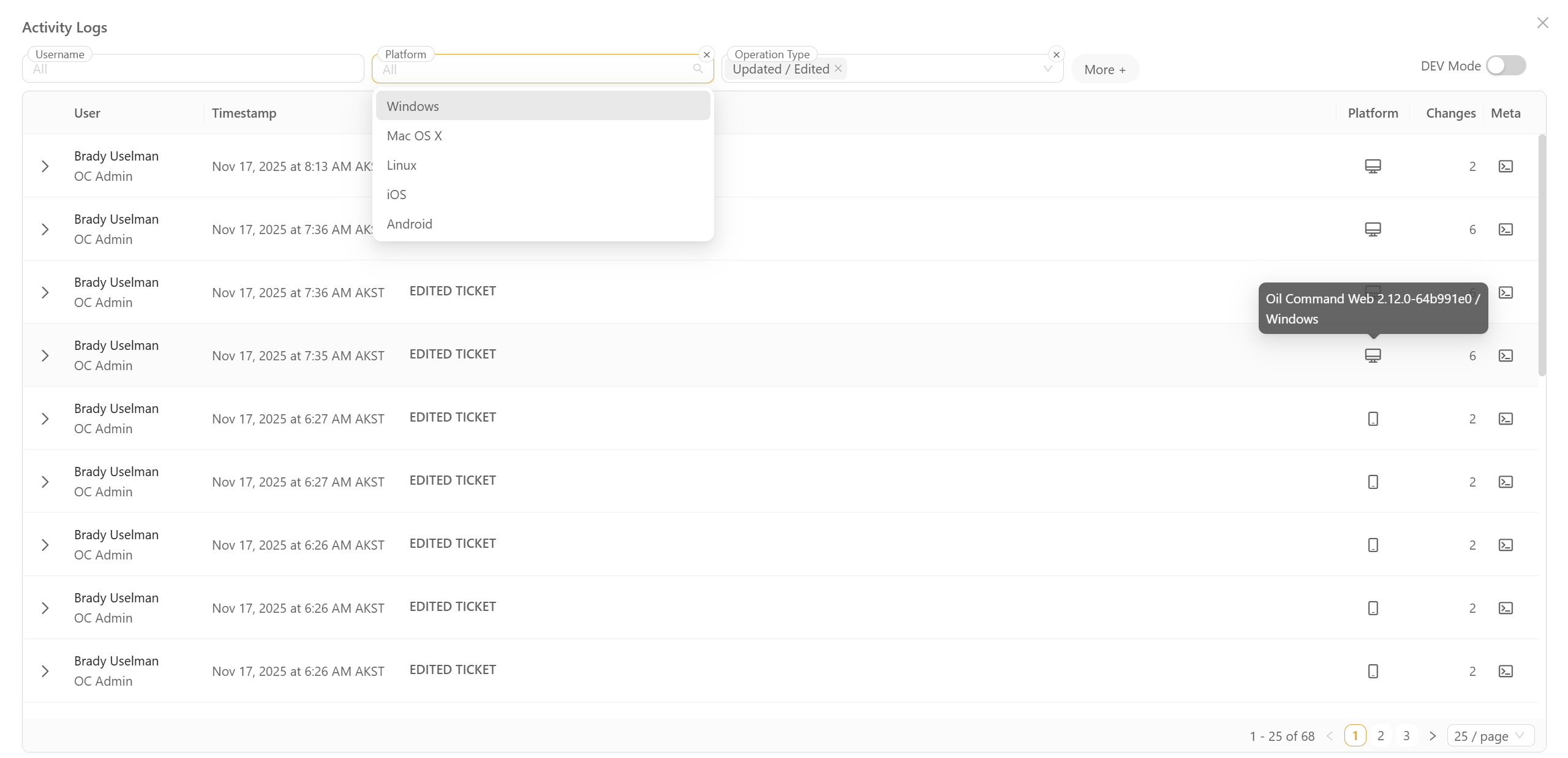
This update introduces a comprehensive Activity Log designed to provide full visibility into system changes. The new interface allows for the monitoring of record updates, field changes, and script edits through a centralized, filterable hub. This ensures complete accountability and simplifies the process of reviewing historical changes for compliance or troubleshooting purposes.
All image attachments are now automatically saved in JPG format. When you upload images in other formats (like PNG, HEIC, or WebP), the system converts them to JPG behind the scenes - you don't need to do anything different.
You can now manage customer pricing and vendor pricing separately. The 'Pricing' tab under Records has been renamed to 'Customer Pricing', and a new 'Vendor Pricing' tab has been added specifically for managing pricing with your vendors.
This separation makes it easier to organize and maintain different pricing structures for the companies you sell to versus the companies you buy from.
You can now add an Audio Recording property to ticket forms, allowing users to record, upload, and attach audio files directly to tickets. This feature includes built-in recording controls, playback functionality, and automatic attachment storage - making it easy to capture verbal notes, customer feedback, or field observations without leaving the ticket.
A new option has been added that allows you to include ticket attachments when sending automated e-mail alerts.
Any files uploaded to a ticket - such as PDFs, images, forms, or supporting documents - can now automatically be added to outgoing alert emails.
This ensures that recipients receive all relevant information at the same time, without needing to manually locate or forward attachments.
Introduced a new Rich Text Display Property type that supports multi-line strings, Markdown formatting, and AI-generated content flagging.
This enhancement improves the readability and structure of AI-generated outputs within Ticket Properties and Memos.
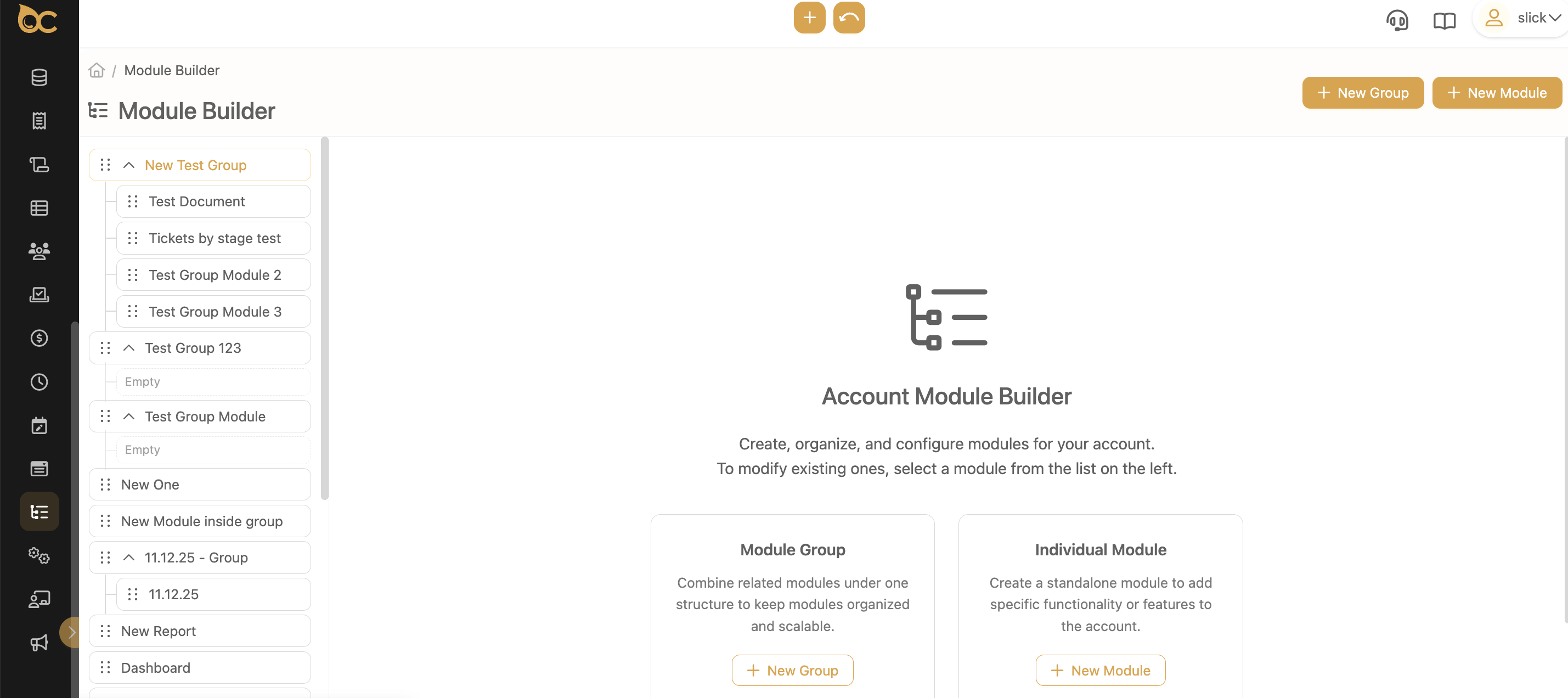
We have improved the Module Builder to make it easier for Support and Account Admin users to organize modules, group them, and navigate large setups without confusion.
These updates help you manage your account structure faster and with fewer steps.
A new “View Contact” button has been added next to the Contact field in tickets.
With one click, you can immediately see the person’s phone number, email, and other key details - without leaving the ticket.
We’ve introduced an improved way to organize large sets of custom forms using a folder-style, collapsible tree structure. This allows teams to keep frequently used forms visible while grouping less frequently used ones - reducing clutter and improving navigation across both desktop and mobile views.
This release introduces the WTI Customer Discount feature, allowing business owners to automatically adjust customer rates based on monthly market conditions.The goal is to help maintain competitive pricing and streamline how discounts are applied across all ticket line items.
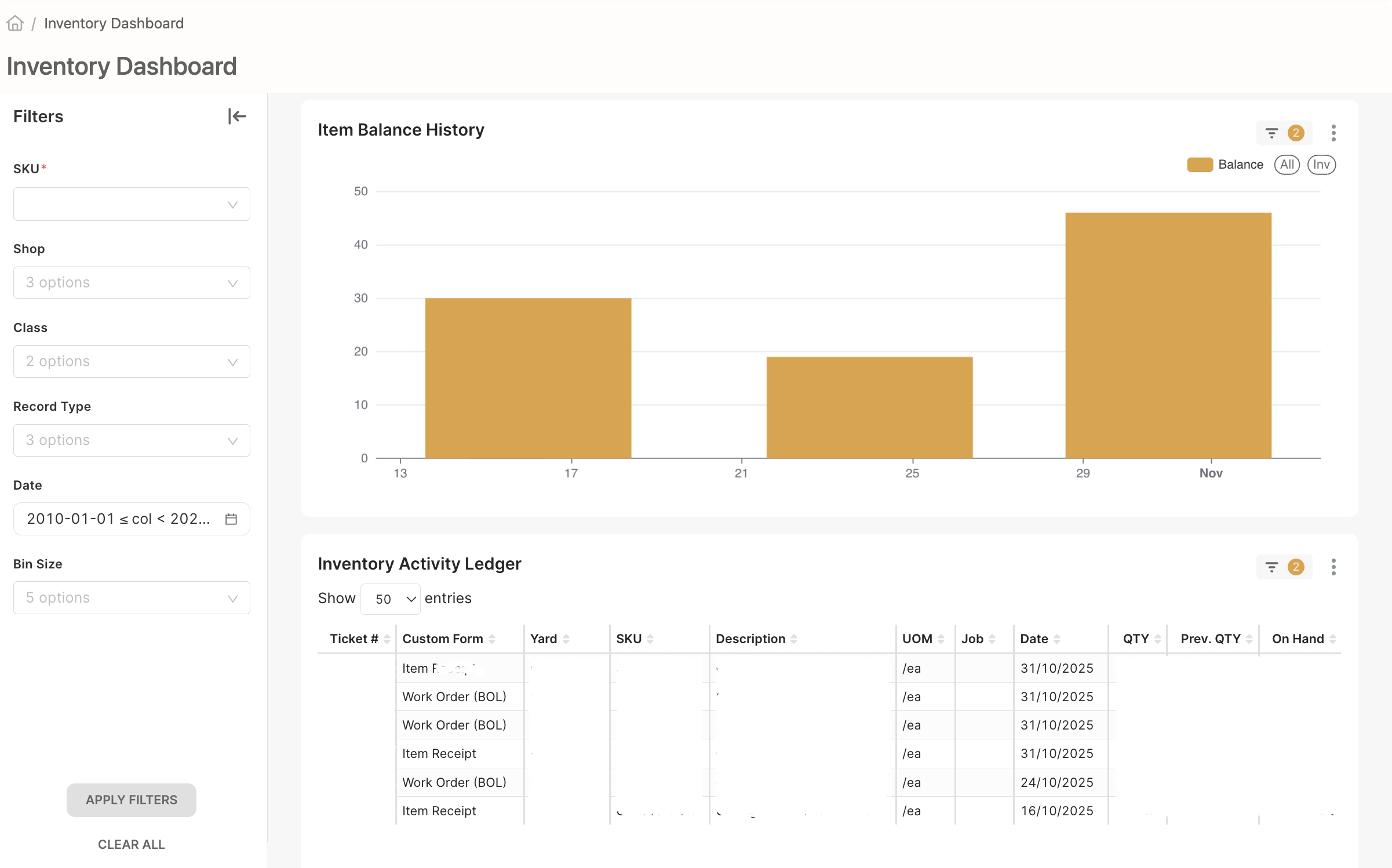
The new Inventory Dashboard helps warehouse managers easily see and track all items in the Shop and Warehouse. It shows what’s in stock, what’s been used, and how inventory changes over time — all in one place.
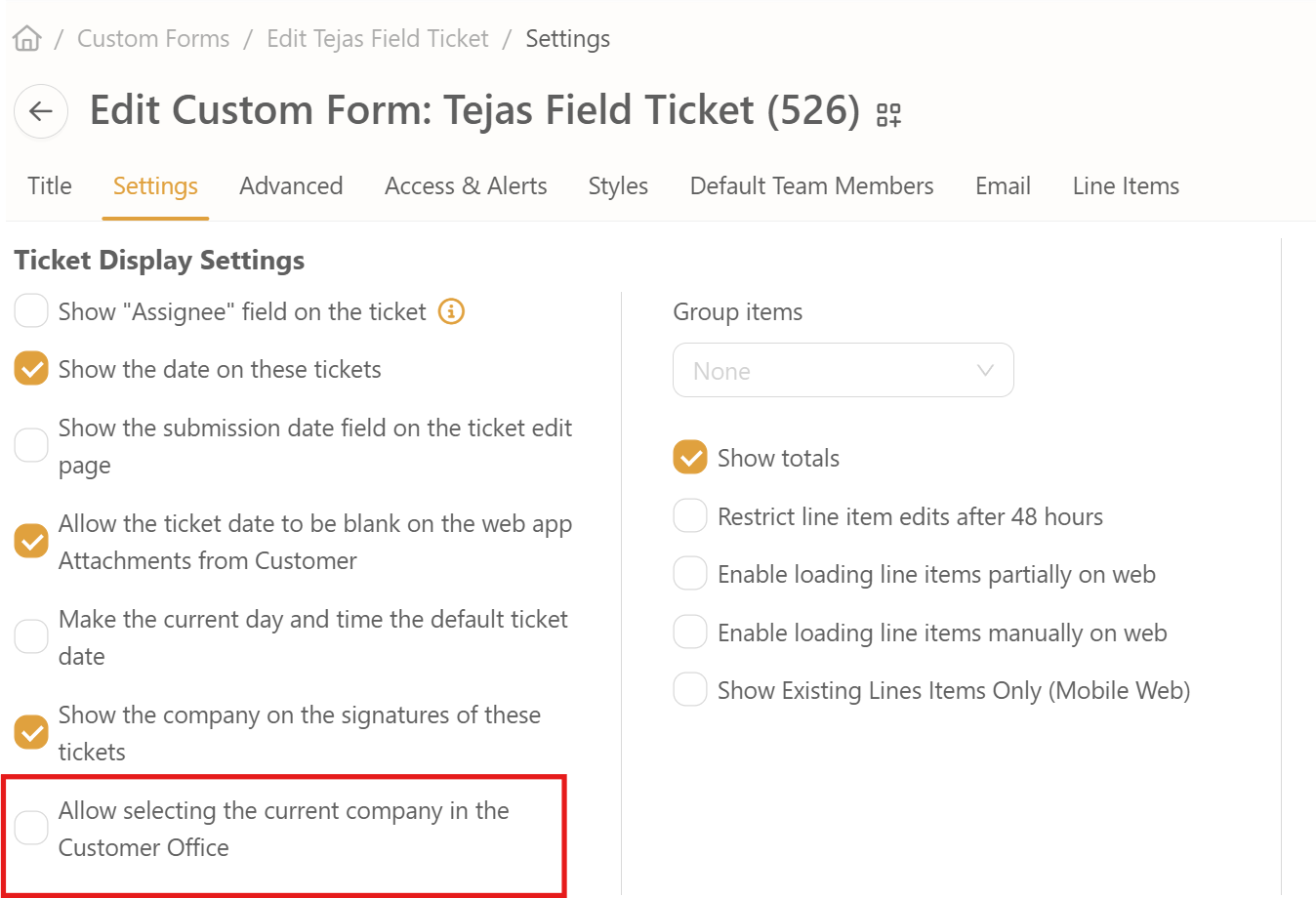
We’ve introduced new flexibility in Custom Form settings and Purchase Order workflows, making it easier for users to manage company selection and vendor assignments without manual intervention.
The Card Layout adapts ticket and stage views into a mobile-friendly format, making it easier for sales reps to quickly scan and interact with key information.
We’ve improved how you build quotes and manage tickets on both web and mobile views. Now you can easily add and review line items directly from your phone or computer—no switching or scrolling through complex layouts.
We’ve enhanced the ticket filtering experience on mobile devices. Now, when viewing tickets by stage, you can easily see which filter is active and quickly change it - no guessing or extra navigation needed.
We’ve made it easier to find exactly what you need in your tickets. With our new Filter Modals, you can quickly narrow down your view without extra steps.
To improve user efficiency when filling out tickets, a new feature has been added that allows web users to copy an existing line item. This enhancement reduces repetitive data entry, saving time and streamlining the ticket creation process.
The Manage Users module has been refactored to align with OilCommand’s new system-wide layout and routing standards. Previously, the module lacked consistency with the updated UI patterns, which led to maintenance challenges and a fragmented user experience. This update introduces a modernized structure, reusable layouts, and partial API update support.
OilCommand Admins needed to open individual user accounts to manage settings, which was time-consuming and inefficient. This created unnecessary navigation steps and slowed down the ability to adjust role configurations for multiple users.
The Documents Module has been enhanced to support direct linking with Confluence Pages. By leveraging the Confluence Space Key and Confluence Root Page ID, users can now associate documents in OilCommand with specific Confluence spaces. This ensures seamless navigation between OilCommand and Confluence, reducing context switching and improving documentation access.
Previously, document references in OilCommand were siloed and lacked a direct connection to Confluence. With this release, users gain streamlined access to linked Confluence resources directly from the Documents Module.
The platform now enforces the V2 UI company-wide, ensuring all users consistently experience the updated interface. V2 will always load by default, with no ability for users to disable it. Legacy (non-V2) modules remain accessible only where a V2 equivalent does not yet exist.
A new Customer Discount feature has been added, enabling business owners to apply monthly market-rate-based discounts to maintain competitiveness. This feature ensures rates are applied consistently across eligible tickets and works seamlessly in both desktop and mobile views.
We’ve added a new “Divisions” tab in the Resource Manager, right next to the existing “Districts” tab. This update reflects how the company now organizes teams and locations.
We’ve launched a new version of the Tickets Map - redesigned to work faster and smoother than ever!
You can now automatically send form emails to Ticket Subscribers - the people assigned to the ticket - using the email templates you already use.
You can now separate permissions when giving team members access to Manage Users, Company Info, and Role Settings in Oil Command.
Instead of giving full control, you can now choose exactly what someone should manage - users, company settings, or custom roles.
When a Superadmin removes a company from a Custom Form, any notifications tied to that form will now be automatically removed for that company.
No more leftover alerts - the system now keeps things clean and accurate behind the scenes.

You can now easily see which Custom Form each notification is connected to on the Settings > Notifications page. This makes managing and understanding your notifications much simpler.
You can now choose how your report results are sorted - either in ascending or descending order. This makes it easier to view the newest or oldest items first, depending on what you need.

We’ve made the “What’s New” page cleaner and easier to scroll through, so you can quickly catch up on the latest updates.
You can now view and download your work schedule directly from the Oil Command platform using the new "My Schedule" module.
You now have more control when editing a Finished Good on a ticket. A new setting lets you decide whether sub-component quantities should update automatically - or stay exactly as you entered them.
You can now drag and drop sub-components (SKUs) into and out of Finished Goods. This gives you more control over what your customer sees, without affecting how the product works behind the scenes.
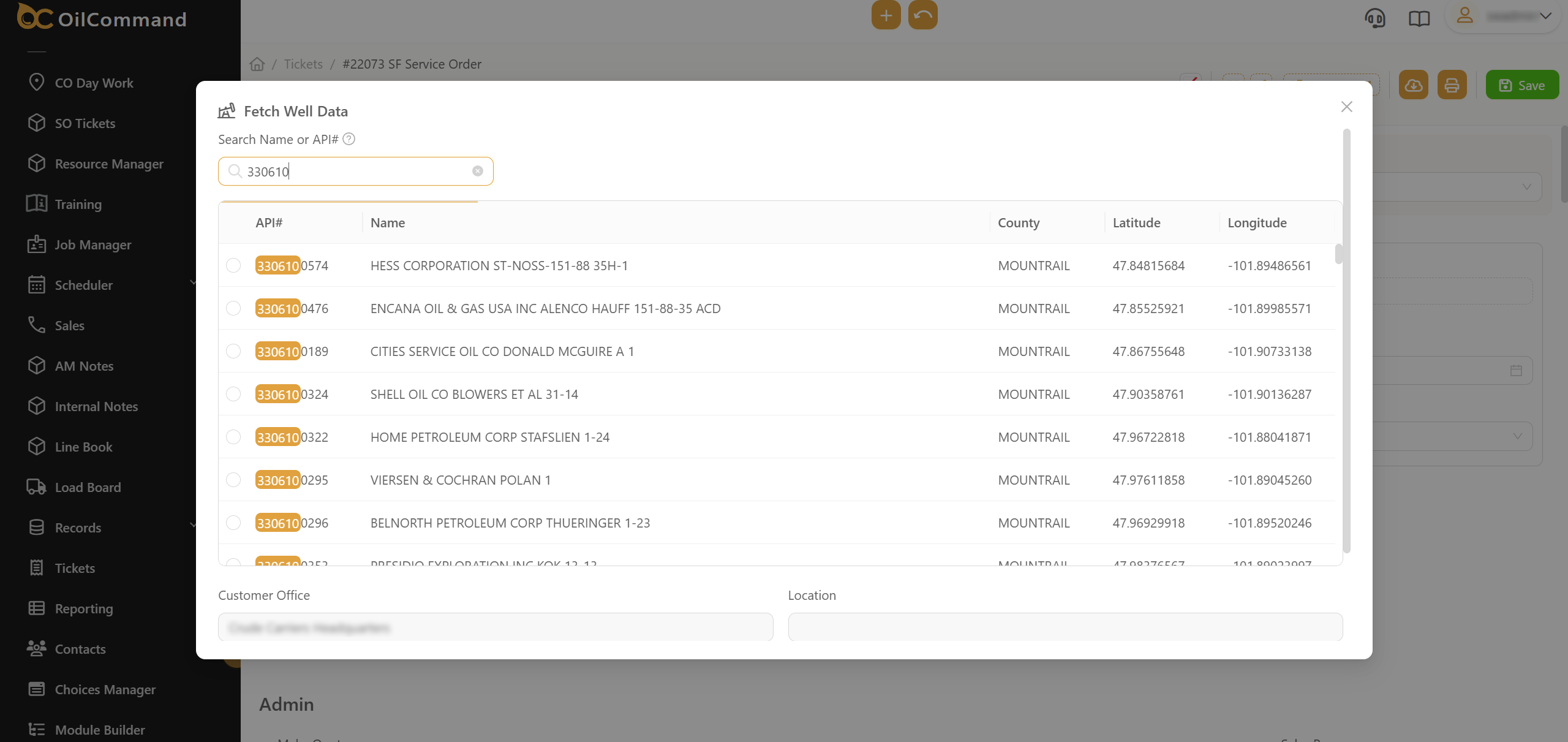
This update enhances the well search functionality by allowing dispatchers and field users to search using extended API numbers. This ensures quicker, more precise access to well data, even when partial or non-standard formats are entered.
Improved visual feedback when using the calendar in Week View. Now, when a specific day is selected using the date picker, that exact day will be visibly highlighted in the calendar - in addition to the full week selection.
We’ve made it easier to identify the right contact when building tickets!
Now, company names are displayed next to customer contact names in the Ticket Builder.
This is especially helpful when contacts share the same name - you can now easily distinguish them based on the company they work for.
You can now quickly delete several line items at once when editing a ticket - no more removing them one by one!
This makes managing tickets faster and easier, especially when you need to clean up many items at the same time.
You can now make buttons that automatically fill in property values when clicked - no coding or scripts needed!
When setting up a Scripted Button, you’ll see a new option in the Button Type list called “Set Property Value.”
Just pick this option, tell the button which fields to fill out and what values to use - and you’re done!
You can now edit category information directly within the table!This new inline editing feature makes it faster and easier to update data without navigating to a separate page.
Now it's even easier for Account Managers and users to create a custom "Signature Request" notification! You can now see special built-in templates (like "Signature Request") and quickly make your own copy to edit - no need to start from scratch.
You can now see all jobs in the Calendar View - even those you’re not assigned to! This helps teams get better visibility into overall scheduling, work distribution, and team coordination.
Added support for displaying the PO# just below the Job Code (AFE) when printing job-related documents. This enhancement makes it easier for users to quickly locate important information in the top of a ticket during reviews or audits.
You can now crop images after you upload them to a ticket. This means you can cut out extra background or focus on just the important part of your photo - all without leaving the app.
We’ve updated the work week view in My Time to align with Monday–Sunday, instead of Sunday–Saturday. This change helps employees better track their time and understand upcoming pay periods.
We’ve made it easier for you to build and view Summary Tickets:
We’ve redesigned the Ticket Calendar to work smoothly on mobile devices. You can now access and manage your daily jobs directly from your phone - no desktop required.
Whether you're in the field or on the move, you can:
This release introduces a critical update to job assignment logic:
This release enhances the Notification Activity table by adding more detailed information to improve visibility and usability. Users can now see the notification type, ticket link, and alert name directly in the table, making it easier to track and manage notifications.
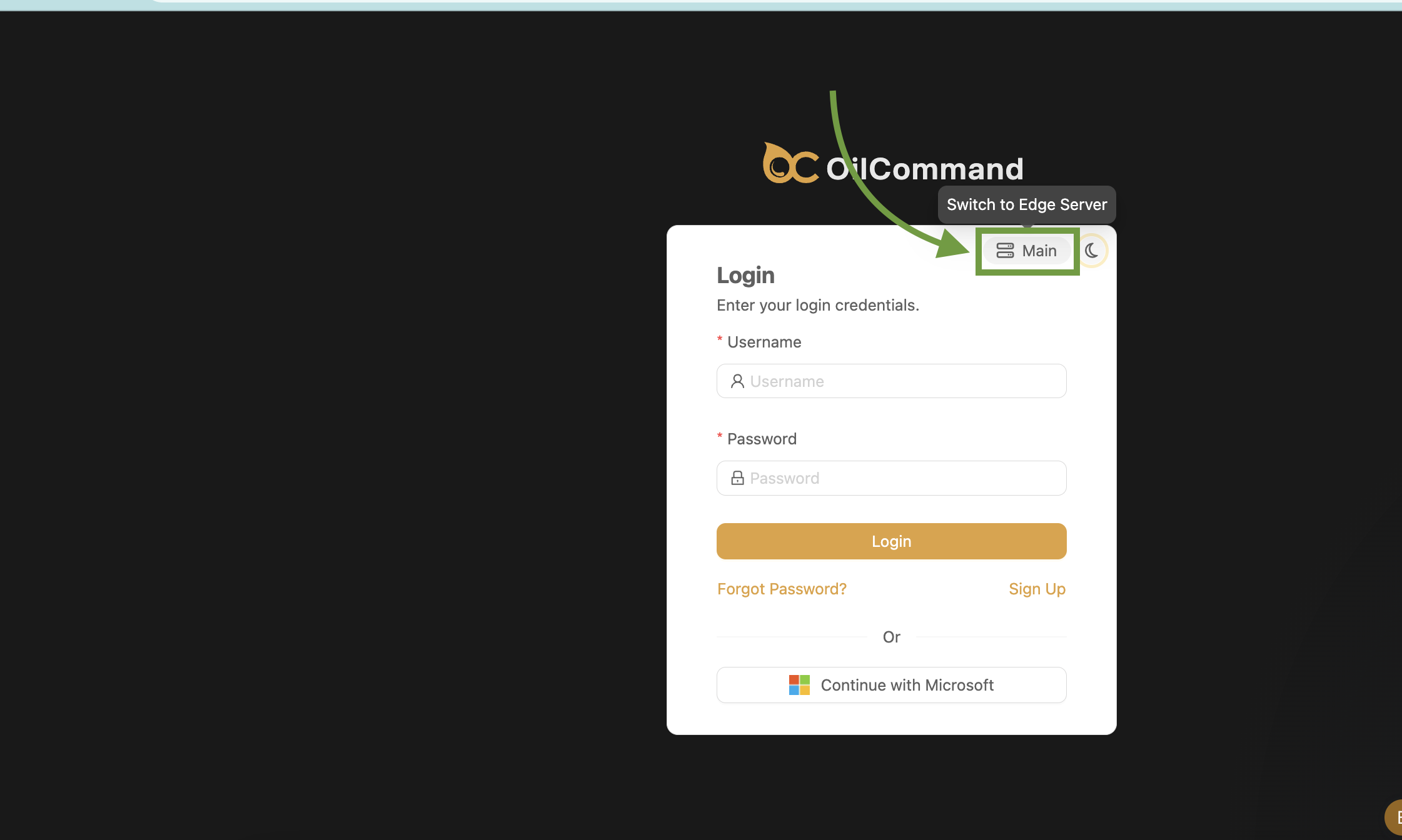
This release introduces an alternative communication channel to our backend. It’s designed to improve uninterrupted service for customers who are unable to connect directly to the API server.
This release introduces the ability to edit all line items at once, improving efficiency and reducing the number of steps required to modify multiple entries.
This release introduces enhancements to the Calendar View, making it more accessible and customizable. Users can now navigate to the calendar directly from the left-hand navigation and apply specific filters to control the displayed content.
Account managers now have an easy way to serialize a logo for offline use. This enhancement verifies that the Logo is accessible even when users are offline, improving usability within the Summarized Ticket custom form in the settings section.
.png)
This release introduces a new safeguard on the web platform to ensure that the mobile app does not unintentionally clear existing property values when syncing data. By enabling this feature, users can prevent missing properties in the payload from causing data deletion.
This release introduces a mechanism to prevent the Default view from bypassing intended filters, amking a more controlled and accurate data representation.
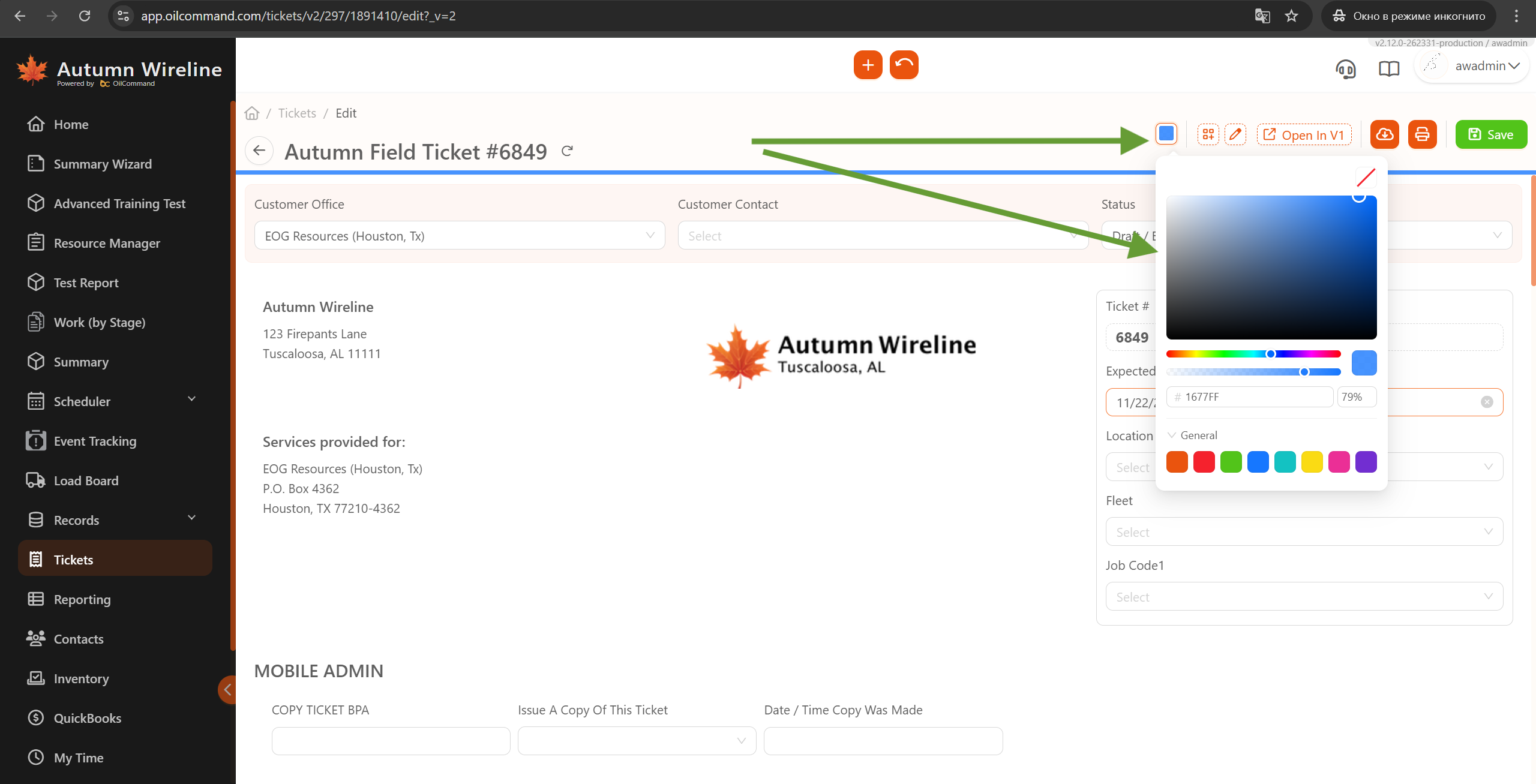
We’ve introduced a Color Picker feature in the Ticket View, allowing users to personalize their experience by adding an accent color to tickets and browser tabs. This enhancement improves ticket visibility and helps users align their workflow between online and offline tasks.
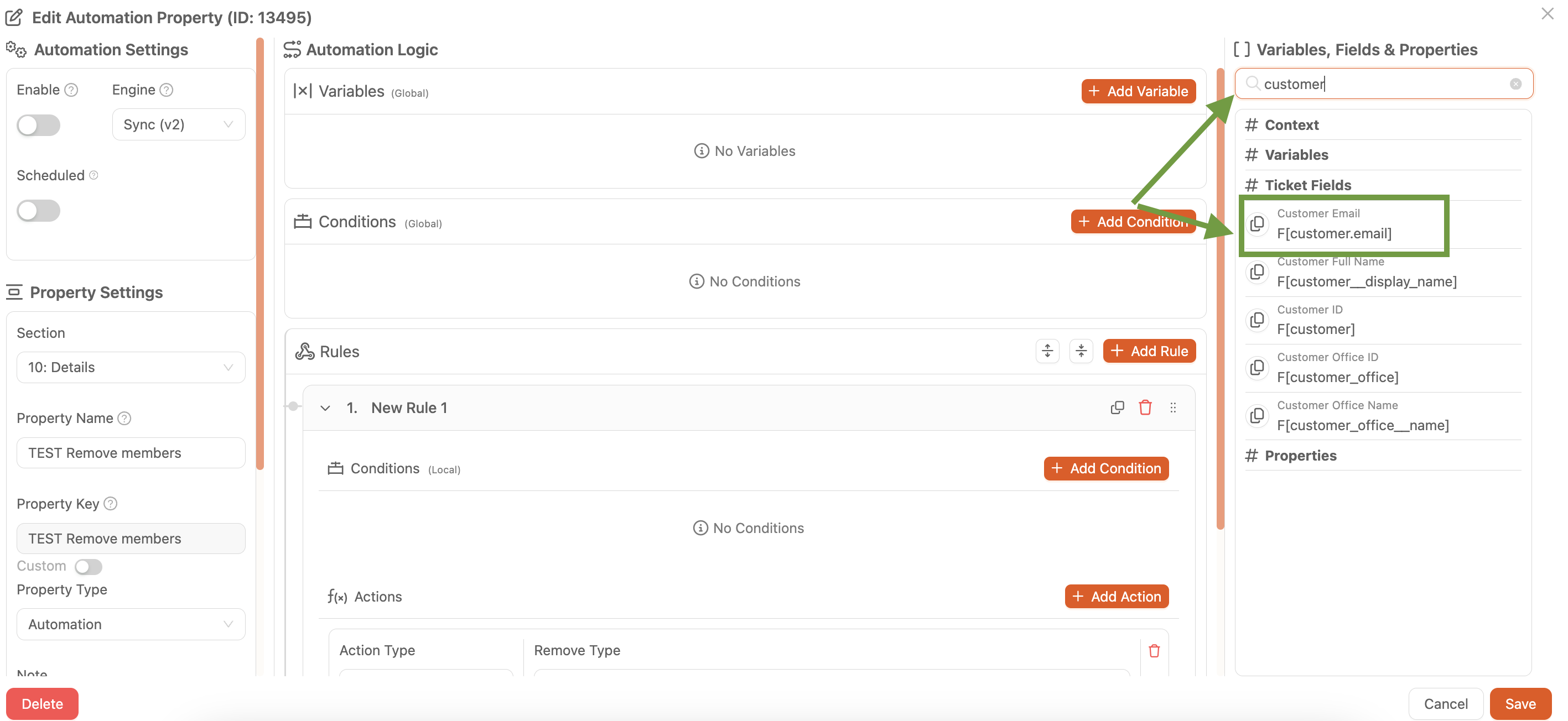
We've enhanced the BPA options by adding the customer email display. The new field F[customer.email] is now available on the right side of the BPA options panel.
We’ve increased the maximum note size in the Calendar feature to 1KB, allowing users to add more details to their event notes. Now, you can document important information more easily without needing multiple entries or external tools.
We've optimized the Custom Form Copying process, significantly improving the speed when copying forms with multiple sections and properties. Now, support users and superadmins can complete copy requests more efficiently without long wait times.
We have introduced a drag & drop functionality for SKU Group items, allowing users to reorder items within a group. This enhancement improves usability and provides greater flexibility when managing SKU Groups.
Bulk status edit for tickets is now supported. User is able to update multiple ticket’s status in once
This update verifies that inactive accounts are properly filtered out and no longer visible in the Contacts section. When an account is reactivated, it will become visible again.
We are glad to present new feature for Calendars: ability to Add Notes. So you can add quick notes to your calendar for potential future jobs -keeping things flexible.
We’ve made it easier to manage customer-specific pricing. Now, when you clear a usage rate (leave it blank) in the Customer Pricing table, the system will automatically remove the related pricing record.
This update removes unnecessary SKU filtering when selecting line items in tickets. Previously, the SKU filter was applied incorrectly, leading to selection issues. With this update, line item selection is no longer restricted by predefined SKU filters, ensuring users can add items without unnecessary constraints
We’ve added a new setting that lets your company standardize the experience by always using the updated V2 (React app) interface for all ticket and load-related pages.
This update improves the scrolling experience by increasing the width of the scrollbar across all pages. The wider scrollbar provides better visibility and easier interaction, especially for users who prefer a more comfortable scrolling experience.
This update allows to reorder charges on tickets for a more logical presentation to customers. Previously, automation on the ticket prevented reordering, but now users can apply custom sorting rules to line items.
This update introduces the ability to edit the Job# (Ticket Name) upon creation, but only when "Use Form Specific Ticket Numbering" is enabled. This enhancement gives business owners more flexibility in managing ticket names.
This update enhances the line item selection process by displaying Category and Subcategory fields while adding items. Users can now filter SKUs by Category and Subcategory, making it easier to choose the correct option when adding new line items.
This update allows custom form editors to view and update notes for properties directly in the Custom Form Editor. Notes can also be updated manually through Business Process Automation (BPA) to manage which text should be displayed.
A new feature has been implemented to automatically remove employees from a ticket once status has been changed to Reviewed.
This update introduces a comprehensive Activity Log designed to provide full visibility into system changes. The new interface allows for the monitoring of record updates, field changes, and script edits through a centralized, filterable hub. This ensures complete accountability and simplifies the process of reviewing historical changes for compliance or troubleshooting purposes.
This release introduces a new capability for accountants to retrieve invoices as PDFs via API. Once an invoice is successfully created in NetSuite, it will be stored as an attachment.
This update introduces the ability to import and export Custom Records directly from the Import/Export page. Users can now manage their records more efficiently without requiring engineering support.
We have introduced a new filtering option in the schedule view, allowing users to easily manage employee visibility based on their work status.
You can now select multiple values for certain fields in the mobile app. This is useful when more than one option applies - like selecting several materials or services used in a job.
We are excited to introduce the ability to import and update SKU properties in bulk! This new feature streamlines SKU management, making it easier for account managers to perform mass updates efficiently.
This release introduces the ability to generate a Quote Cover Page in the system. Sales teams can now create detailed quotes that include customer information, a structured cover page, and company branding.
You can now easily duplicate tickets in the Tickets Views with just one click! We’ve added a new [Copy] button next to each ticket to help you work faster and save time when creating similar or repeating tickets.
To improve typing accuracy and overall user experience, the Oil Command mobile app now includes autocorrect functionality during text entry. This feature automatically corrects spelling errors as users type in input fields across the app.
%20via%20Microsoft%20365%20available%20on%20Mobile.PNG)
Mobile users can now log in to the Oil Command app using their Microsoft 365 account. This update introduces Single Sign-On (SSO) support via OAuth 2.0, streamlining access and reducing login issues.
We’ve made it much easier to import tickets into the system using email and Excel files. These updates save time, reduce manual work, and improve how you manage templates and ticket data.
This update introduces a unified notification templating system, allowing for streamlined Email and SMS alerts. The new system enhances flexibility by integrating a more reliable delivery method for transactional messaging.
New Settings Added to Module Builder for “Tickets” and “Tickets by Stage”:
Summary Ticket modal now includes the Attachment Type setting.
Default Tickets and Loads pages also show the “Attachment Type” in the Summary Ticket modal.
Summary Wizard module is now deprecated.
This update brings full customization parity to the Customer Information section. Administrators can now edit the "CustomerInfo" label title directly within the Layout Editor, matching the behavior of other section titles. This change also includes a UI cleanup by removing the legacy gray header bar, providing a more modern, streamlined look that synchronizes instantly across both web and mobile platforms.
This release introduces the WTI Customer Discount feature, allowing business owners to automatically adjust customer rates based on monthly market conditions.The goal is to help maintain competitive pricing and streamline how discounts are applied across all ticket line items.
Account managers now have an easy way to serialize a logo for offline use. This enhancement verifies that the Logo is accessible even when users are offline, improving usability within the Summarized Ticket custom form in the settings section.
This release introduces a new safeguard on the web platform to ensure that the mobile app does not unintentionally clear existing property values when syncing data. By enabling this feature, users can prevent missing properties in the payload from causing data deletion.
You can now select multiple values for certain fields in the mobile app. This is useful when more than one option applies - like selecting several materials or services used in a job.
To improve typing accuracy and overall user experience, the Oil Command mobile app now includes autocorrect functionality during text entry. This feature automatically corrects spelling errors as users type in input fields across the app.
Mobile users can now log in to the Oil Command app using their Microsoft 365 account. This update introduces Single Sign-On (SSO) support via OAuth 2.0, streamlining access and reducing login issues.
This update introduces the ability to combine multiple individual line items into a single consolidated "Summary Ticket" directly from the Line Items table view. This feature mirrors the "Summarize Tickets" functionality but operates at the line-item level, allowing for more granular billing and operational control. Additionally, it introduces "Summary Settings" in the Module Builder to automate the configuration process.
This update introduces comprehensive arrow key support for the Line Item interface, allowing users to navigate and edit ticket details more efficiently without relying on a mouse. By enabling cell-by-cell keyboard navigation and quick-edit shortcuts, the system significantly speeds up data entry and updates for tickets with multiple categories and line items.
This update introduces a powerful "Copy Company" functionality specifically for Super Admins. Designed to accelerate the onboarding of new vendors and partners, this feature allows for the precise duplication of existing account configurations into new environments. By utilizing a "Template" approach, manual setup time is drastically reduced, ensuring consistency across multiple accounts while minimizing human error.
This update introduces an "Inactive" checkbox for Private Companies' Offices, allowing for better control over which entities appear during ticket creation. By enabling the ability to mark offices as Active or Inactive, the system ensures that only relevant, current business partners are visible, significantly reducing clutter and selection errors.
This update introduces a comprehensive Activity Log designed to provide full visibility into system changes. The new interface allows for the monitoring of record updates, field changes, and script edits through a centralized, filterable hub. This ensures complete accountability and simplifies the process of reviewing historical changes for compliance or troubleshooting purposes.
You can now add an Audio Recording property to ticket forms, allowing users to record, upload, and attach audio files directly to tickets. This feature includes built-in recording controls, playback functionality, and automatic attachment storage - making it easy to capture verbal notes, customer feedback, or field observations without leaving the ticket.
We have improved the Module Builder to make it easier for Support and Account Admin users to organize modules, group them, and navigate large setups without confusion.
These updates help you manage your account structure faster and with fewer steps.
A new “View Contact” button has been added next to the Contact field in tickets.
With one click, you can immediately see the person’s phone number, email, and other key details - without leaving the ticket.
The new Inventory Dashboard helps warehouse managers easily see and track all items in the Shop and Warehouse. It shows what’s in stock, what’s been used, and how inventory changes over time — all in one place.
You can now automatically send form emails to Ticket Subscribers - the people assigned to the ticket - using the email templates you already use.
You now have more control when editing a Finished Good on a ticket. A new setting lets you decide whether sub-component quantities should update automatically - or stay exactly as you entered them.
You can now quickly delete several line items at once when editing a ticket - no more removing them one by one!
This makes managing tickets faster and easier, especially when you need to clean up many items at the same time.
You can now edit category information directly within the table!This new inline editing feature makes it faster and easier to update data without navigating to a separate page.
You can now crop images after you upload them to a ticket. This means you can cut out extra background or focus on just the important part of your photo - all without leaving the app.
We’ve made it easier for you to build and view Summary Tickets:
This release introduces the ability to edit all line items at once, improving efficiency and reducing the number of steps required to modify multiple entries.
We’ve introduced a Color Picker feature in the Ticket View, allowing users to personalize their experience by adding an accent color to tickets and browser tabs. This enhancement improves ticket visibility and helps users align their workflow between online and offline tasks.
We have introduced a drag & drop functionality for SKU Group items, allowing users to reorder items within a group. This enhancement improves usability and provides greater flexibility when managing SKU Groups.
We are glad to present new feature for Calendars: ability to Add Notes. So you can add quick notes to your calendar for potential future jobs -keeping things flexible.
We’ve added a new setting that lets your company standardize the experience by always using the updated V2 (React app) interface for all ticket and load-related pages.
A new feature has been implemented to automatically remove employees from a ticket once status has been changed to Reviewed.
We have introduced a new filtering option in the schedule view, allowing users to easily manage employee visibility based on their work status.
We are excited to introduce the ability to import and update SKU properties in bulk! This new feature streamlines SKU management, making it easier for account managers to perform mass updates efficiently.
This release introduces the ability to generate a Quote Cover Page in the system. Sales teams can now create detailed quotes that include customer information, a structured cover page, and company branding.
You can now easily duplicate tickets in the Tickets Views with just one click! We’ve added a new [Copy] button next to each ticket to help you work faster and save time when creating similar or repeating tickets.
Mobile users can now log in to the Oil Command app using their Microsoft 365 account. This update introduces Single Sign-On (SSO) support via OAuth 2.0, streamlining access and reducing login issues.
This update introduces a comprehensive Activity Log designed to provide full visibility into system changes. The new interface allows for the monitoring of record updates, field changes, and script edits through a centralized, filterable hub. This ensures complete accountability and simplifies the process of reviewing historical changes for compliance or troubleshooting purposes.
This update introduces a comprehensive "Download & Sign" workflow within the Secure Customer Portal. Designed for partners who require physical stamps or manual signatures, this hybrid process allows customers to confirm or edit critical job data digitally before printing the ticket. Once physically signed, the document can be uploaded directly back into the portal, ensuring all authorizations are centralized, audited, and instantly visible for billing.
This update introduces a comprehensive status management system for line items, moving away from a fixed, hardcoded list. Administrators can now define which statuses are active for specific modules, set default behaviors, and control whether the status field is editable or read-only. This ensures that the line item workflow precisely matches the operational needs of different business units.
This update introduces a robust, template-based rendering system (v2) for ticket printouts, replacing legacy hardcoded formats. By utilizing a dynamic rendering engine and configurable placeholders, administrators can now design customizable layouts and content variations that cater to specific client needs and diverse operational use cases.
This update introduces a specialized Currency configuration for Integer and Decimal properties. Users can now define monetary fields that automatically display with professional formatting, including dollar signs and thousands separators (e.g., $34,900.22). This ensures financial data is presented clearly and consistently across the entire platform, from initial data entry to final printed tickets and reports.
This update expands the company classification system by adding "Customer" as a standard option in the Company Type dropdown. This ensures that client records are properly identified and consistently categorized across all major workflows - from initial contact creation to ticket assignment - allowing for more accurate reporting and data organization.
This update introduces the ability to manually define the sequence of line item sections on both the ticket page and final printouts. By moving away from default alphabetical sorting, Account Admins can now position specific categories - such as operational logs or financial charges - exactly where they are needed to improve document clarity.
This update introduces comprehensive arrow key support for the Line Item interface, allowing users to navigate and edit ticket details more efficiently without relying on a mouse. By enabling cell-by-cell keyboard navigation and quick-edit shortcuts, the system significantly speeds up data entry and updates for tickets with multiple categories and line items.
This update streamlines the ticket finalization process by introducing an integrated data entry step within the signature workflow. Instead of filling out secondary fields on the ticket page, customers are now presented with a "Fill the form" modal immediately after clicking [Sign Ticket]. This ensures all required information is captured in a focused, step-by-step manner, providing better clarity and a smoother experience for the customer before the signature is applied.
All image attachments are now automatically saved in JPG format. When you upload images in other formats (like PNG, HEIC, or WebP), the system converts them to JPG behind the scenes - you don't need to do anything different.
You can now add an Audio Recording property to ticket forms, allowing users to record, upload, and attach audio files directly to tickets. This feature includes built-in recording controls, playback functionality, and automatic attachment storage - making it easy to capture verbal notes, customer feedback, or field observations without leaving the ticket.
A new option has been added that allows you to include ticket attachments when sending automated e-mail alerts.
Any files uploaded to a ticket - such as PDFs, images, forms, or supporting documents - can now automatically be added to outgoing alert emails.
This ensures that recipients receive all relevant information at the same time, without needing to manually locate or forward attachments.
Introduced a new Rich Text Display Property type that supports multi-line strings, Markdown formatting, and AI-generated content flagging.
This enhancement improves the readability and structure of AI-generated outputs within Ticket Properties and Memos.
A new “View Contact” button has been added next to the Contact field in tickets.
With one click, you can immediately see the person’s phone number, email, and other key details - without leaving the ticket.
We’ve introduced new flexibility in Custom Form settings and Purchase Order workflows, making it easier for users to manage company selection and vendor assignments without manual intervention.
The Card Layout adapts ticket and stage views into a mobile-friendly format, making it easier for sales reps to quickly scan and interact with key information.
We’ve improved how you build quotes and manage tickets on both web and mobile views. Now you can easily add and review line items directly from your phone or computer—no switching or scrolling through complex layouts.
We’ve enhanced the ticket filtering experience on mobile devices. Now, when viewing tickets by stage, you can easily see which filter is active and quickly change it - no guessing or extra navigation needed.
We’ve made it easier to find exactly what you need in your tickets. With our new Filter Modals, you can quickly narrow down your view without extra steps.
To improve user efficiency when filling out tickets, a new feature has been added that allows web users to copy an existing line item. This enhancement reduces repetitive data entry, saving time and streamlining the ticket creation process.
We’ve added a new UI that lets users customize how custom forms look when printed.
A new Customer Discount feature has been added, enabling business owners to apply monthly market-rate-based discounts to maintain competitiveness. This feature ensures rates are applied consistently across eligible tickets and works seamlessly in both desktop and mobile views.
You can now drag and drop sub-components (SKUs) into and out of Finished Goods. This gives you more control over what your customer sees, without affecting how the product works behind the scenes.
This update enhances the well search functionality by allowing dispatchers and field users to search using extended API numbers. This ensures quicker, more precise access to well data, even when partial or non-standard formats are entered.
We’ve made it easier to identify the right contact when building tickets!
Now, company names are displayed next to customer contact names in the Ticket Builder.
This is especially helpful when contacts share the same name - you can now easily distinguish them based on the company they work for.
You can now quickly delete several line items at once when editing a ticket - no more removing them one by one!
This makes managing tickets faster and easier, especially when you need to clean up many items at the same time.
You can now see all jobs in the Calendar View - even those you’re not assigned to! This helps teams get better visibility into overall scheduling, work distribution, and team coordination.
Added support for displaying the PO# just below the Job Code (AFE) when printing job-related documents. This enhancement makes it easier for users to quickly locate important information in the top of a ticket during reviews or audits.
You can now crop images after you upload them to a ticket. This means you can cut out extra background or focus on just the important part of your photo - all without leaving the app.
We’ve made it easier for you to build and view Summary Tickets:
This release introduces the ability to edit all line items at once, improving efficiency and reducing the number of steps required to modify multiple entries.
This release introduces a mechanism to prevent the Default view from bypassing intended filters, amking a more controlled and accurate data representation.
We’ve introduced a Color Picker feature in the Ticket View, allowing users to personalize their experience by adding an accent color to tickets and browser tabs. This enhancement improves ticket visibility and helps users align their workflow between online and offline tasks.
Bulk status edit for tickets is now supported. User is able to update multiple ticket’s status in once
This update removes unnecessary SKU filtering when selecting line items in tickets. Previously, the SKU filter was applied incorrectly, leading to selection issues. With this update, line item selection is no longer restricted by predefined SKU filters, ensuring users can add items without unnecessary constraints
We’ve added a new setting that lets your company standardize the experience by always using the updated V2 (React app) interface for all ticket and load-related pages.
This update allows to reorder charges on tickets for a more logical presentation to customers. Previously, automation on the ticket prevented reordering, but now users can apply custom sorting rules to line items.
This update introduces the ability to edit the Job# (Ticket Name) upon creation, but only when "Use Form Specific Ticket Numbering" is enabled. This enhancement gives business owners more flexibility in managing ticket names.
This update enhances the line item selection process by displaying Category and Subcategory fields while adding items. Users can now filter SKUs by Category and Subcategory, making it easier to choose the correct option when adding new line items.
This update allows custom form editors to view and update notes for properties directly in the Custom Form Editor. Notes can also be updated manually through Business Process Automation (BPA) to manage which text should be displayed.
A new feature has been implemented to automatically remove employees from a ticket once status has been changed to Reviewed.
This update introduces a comprehensive Activity Log designed to provide full visibility into system changes. The new interface allows for the monitoring of record updates, field changes, and script edits through a centralized, filterable hub. This ensures complete accountability and simplifies the process of reviewing historical changes for compliance or troubleshooting purposes.
This release introduces a new capability for accountants to retrieve invoices as PDFs via API. Once an invoice is successfully created in NetSuite, it will be stored as an attachment.
You can now select multiple values for certain fields in the mobile app. This is useful when more than one option applies - like selecting several materials or services used in a job.
We are excited to introduce the ability to import and update SKU properties in bulk! This new feature streamlines SKU management, making it easier for account managers to perform mass updates efficiently.
This release introduces the ability to generate a Quote Cover Page in the system. Sales teams can now create detailed quotes that include customer information, a structured cover page, and company branding.
You can now easily duplicate tickets in the Tickets Views with just one click! We’ve added a new [Copy] button next to each ticket to help you work faster and save time when creating similar or repeating tickets.
We’ve made it much easier to import tickets into the system using email and Excel files. These updates save time, reduce manual work, and improve how you manage templates and ticket data.
New Settings Added to Module Builder for “Tickets” and “Tickets by Stage”:
Summary Ticket modal now includes the Attachment Type setting.
Default Tickets and Loads pages also show the “Attachment Type” in the Summary Ticket modal.
Summary Wizard module is now deprecated.

